 AJAX Register gives your Joomla site a better user experience for registration through inline field validation, also allowing you to extend your registration form with unlimited number of custom fields saved under each user profile.
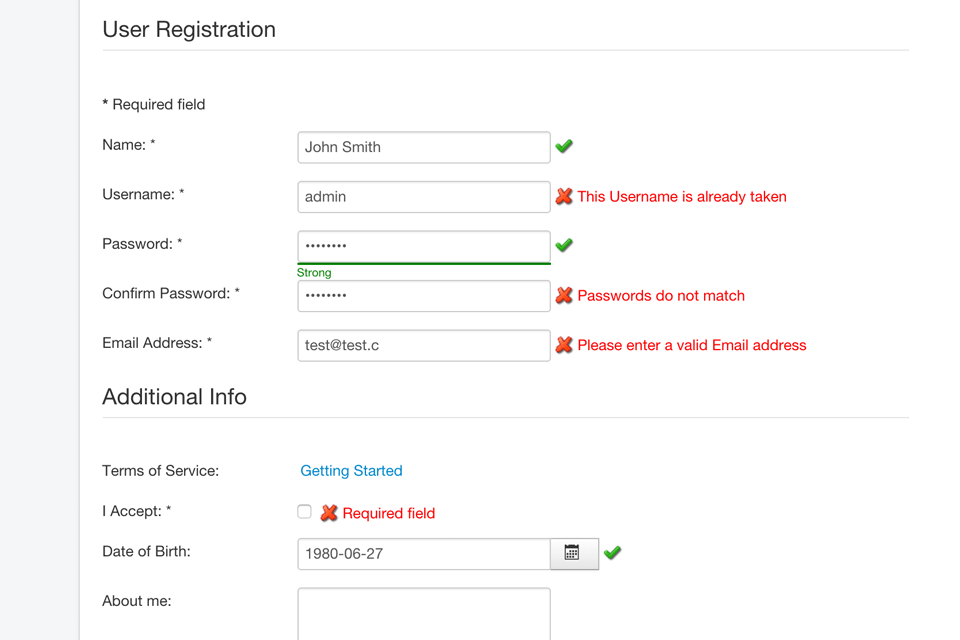
AJAX Register will validate all required fields as you type presenting inline error messages. It will asynchronously check for username and email availability without page refresh so the user will not need to type all fields again should the username or email be already taken.
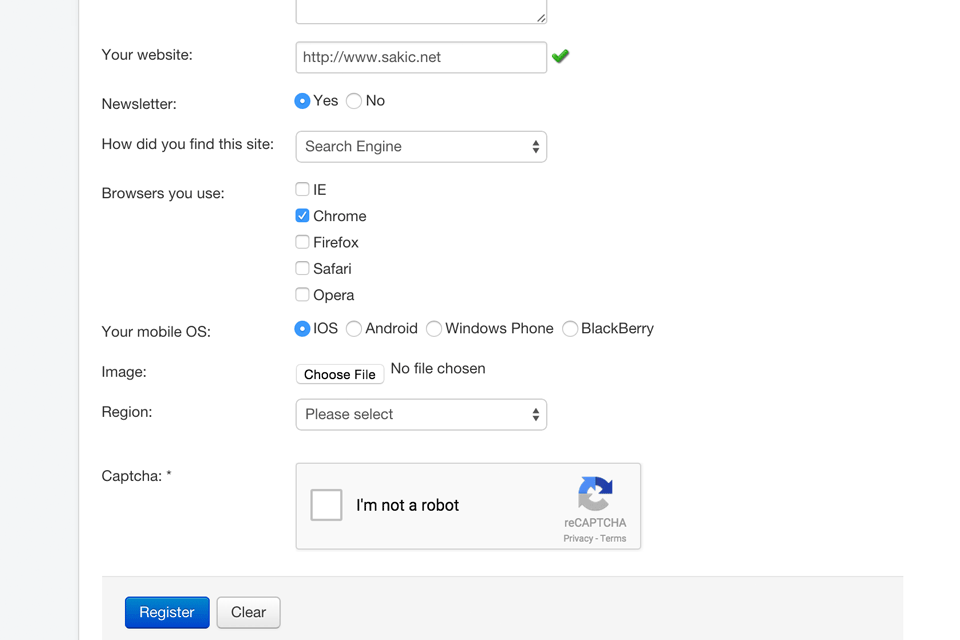
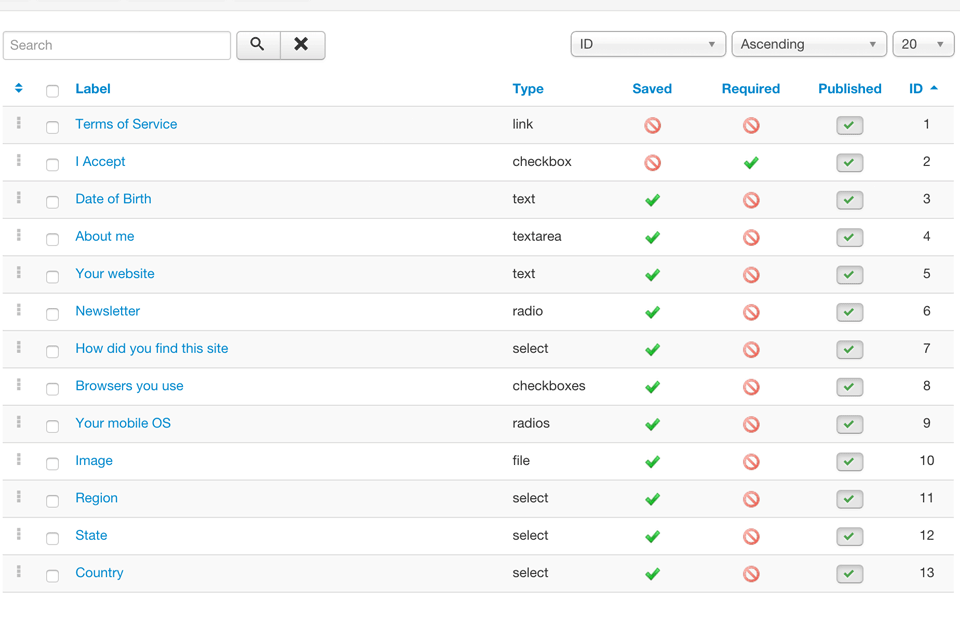
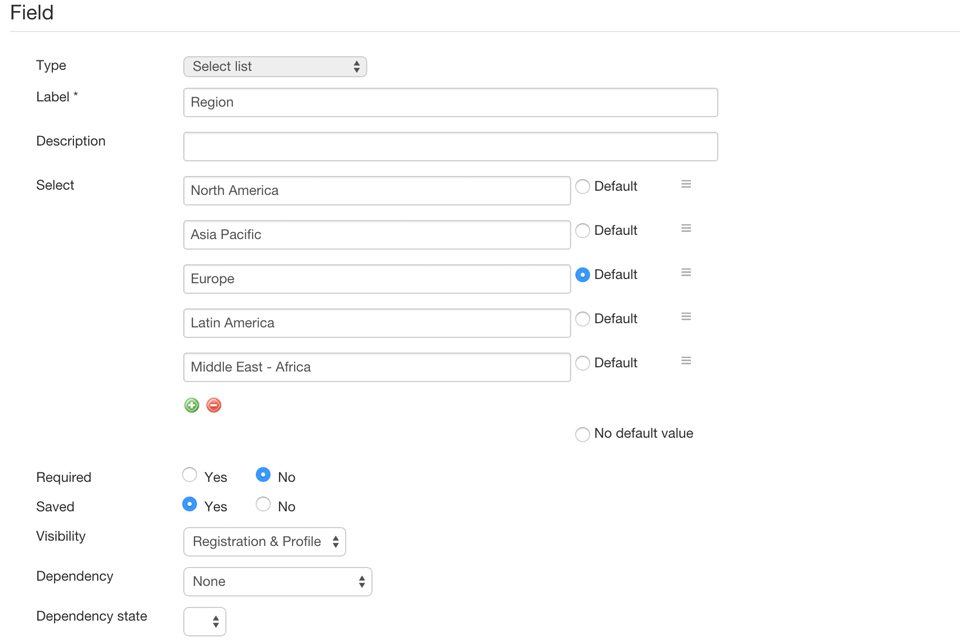
You can create additional text or text area input fields or even radio buttons, select lists or check boxes with unlimited number of options, upload fields for images and documents which allows you to require additional information on registration that is perfectly fit for just your site.
Besides giving a better user experience, AJAX Register will also eliminate spammers via several types of CAPTCHA options.
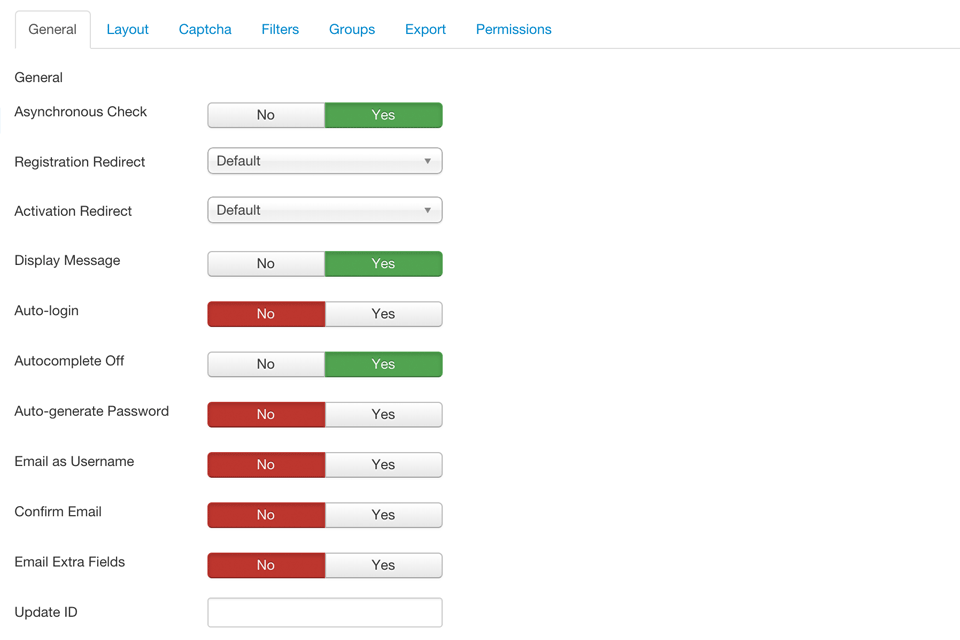
It also features auto-login after successful registration, custom redirection URLs, Email as Username option, automatic password generation, selectable user group and multiple forms to register users into different user groups, each group with different custom fields for registration.
AJAX Register will seamlessly override Joomla's own registration component, you won't even notice it's there. Just install it and you already have the new, AJAX based account registration. But would you need to customise it, you will find different configuration options in admin, with powerful layout and translation possibilities.
Increase number of registered users on your Joomla site by offering a user-friendly, foolproof registration experience!
Check out the screenshots, see what others are saying about AJAX Register and be sure to see it in action on our DEMO site.
- AJAX technology, making the registration process quick and user friendly
- Seamless integration overriding the core registration component
- Easy installation, no additional settings required, no core hacks
- Native MVC structure
- Add unlimited custom fields for registration
- On-the-fly field validation as you type
- Asynchronous check for username and email availability
- Live password strength check
- Error messages and information inline presentation
- Redirection options after successful registration and email confirmation, to referrer or custom URL
- Possibility to turn system messages on and off
- Option for auto-login after successful registration and account activation
- Built-in CAPTCHA, reCAPTCHA (v1/v2/Invisible), hCaptcha, Cloudflare Turnstile, Honeypot, custom questions
- Extra field types: text field, textarea, select list, checkboxes, radio buttons, links, file upload, info text
- Auto-generated fields supporting patterns for User ID or random number or string
- Unlimited number of options for multi-select fields
- Conditional fields, set custom dependency for each field
- Allow user to select user group(s) to be registered into, choose available groups
- Create multiple registration forms to register users to different groups
- Possibility to have different extra fields for different registration forms
- Custom redirect options for different registration forms
- Email extra fields values after each registration to administrators
- Option to use Email as Username
- Optional automatic password generation on registration
- Option to separate First Name and Last Name on registration
- Username blocks, words censor
- IP filters, whitelist/blacklist, ranges and wildcards supported
- Backend administration with customization settings
- Custom fields info available with user profile and user manager
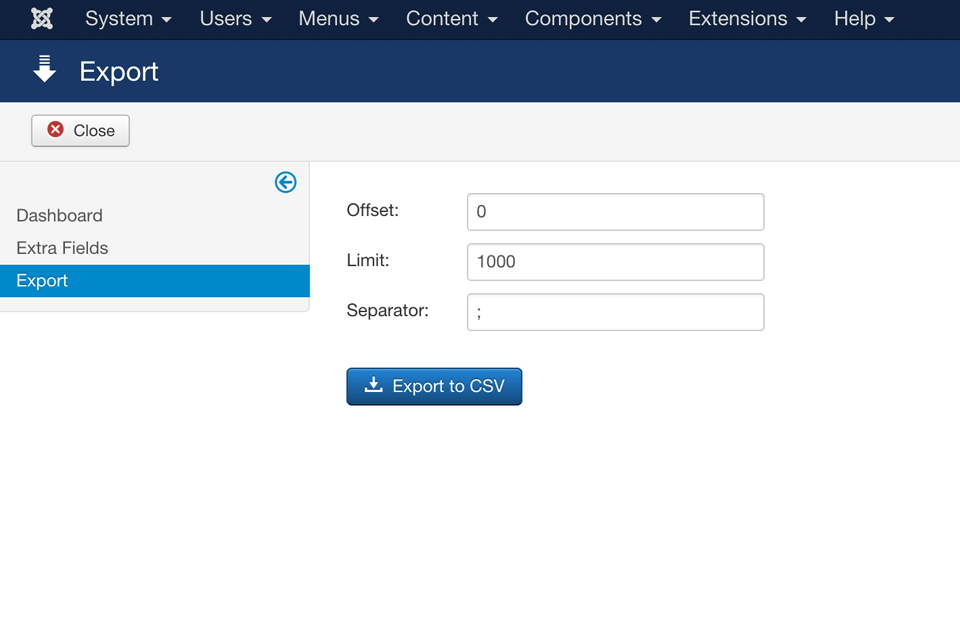
- Users CSV export with custom fields info, including ID, Date, IP address
- ACL permissions for backend
- Automatic one-click updates
- Multi-language support, simple translation
- Templates for easy layout editing
- CSS styling
- Compatible with Joomla 5, 4, 3, 2.5 and 1.5
I’ve tested the functionality and you’ve delivered just what we needed. Thank you very much!
Kent Chadwick, WPC
I've found AJAX Register to suit my needs quite well, and at about half the cost of the package I was previously considering! Great work.
Matt Heinmuller, Chill Logic Co.
Ajax Register is by far the best extension out there for clients who simply want to extend the Joomla Registration form - perfect! Thanks again.
Jeannette Duguay, JenTekk Web Solutions
It's the best of the best component for Joomla. Excellent, thank you very much.
Dagoberto Diaz, paginaswebmexico.com
I purchased your fantastic plugin -- AJAX-Register. Thank you for great extension. Works beautifully!
Patrick Vermont, artpartcentral.com
Your 2.0 update looks unbelievable. This changes Joomla in a big way. Really improves an already awesome component in a very subtle yet highly useful and practical way. Perfection!
Jordan Weinstein, drjjw.com
Your AJAX Register Joomla component has proved delightfully trouble free. I'm greatly impressed by how trouble free that was.
Peter Walker, red ripe
Thanks for the fantastic component, makes the site more professional.
Martyn Mills, retailassist.ie
Thank you for Ajax Register. What a great (painless) product. Easy to obtain, easy to install, easy to configure. No hacks (the way it should be)! It was a pleasure to pay for.
Josh Taylor, bikepasa.com
Excellent component! Now I don't have to worry for spamming registrations. I installed on ovejerismo.com and it stops the spam!
Luis Angel Camargo, ovejerismo.com
I recently purchaced your new AJAX Registration for J! 1.5 and, as usually, it is exceptional! At any rate just thought to thank you for your excellent products.
Steve Breitborde, shbconsulting.com
The quickest, most efficient and valid AJAX registration out there. A most effective Spam prevention registration system. The impressive proactive support from the developer.
The Herdboy Web Design, herdboy.com
Great stuff!
Gregory Roussel, octeam.fr
AJAX Register is great!
René
AJAX Register uses language files for its dialogues. To translate it copy the file: language/en-GB/en-GB.com_ajaxregister.ini and rename it to whatever your language code is.
For example, if you are translating it to German you would copy it to: language/de-DE/de-DE.com_ajaxregister.ini. Then translate the strings within the file. Make sure that each string is in one single line and it's best to avoid single quotes ('). To translate the admin part you do the same thing with the file: administrator/language/en-GB/en-GB.com_ajaxregister.ini.
You can also use components like Translations Manager (J1.5) and Localise (J2.5) which can help you translate the files right from your Joomla administration.
To translate the extra fields labels you need to use one word string for the label, like TERMS_OF_SERVICE which you then translate in the language files:
/language/en-GB/en-GB.com_ajaxregister.ini
/language/de-DE/de-DE.com_ajaxregister.ini
etc.
Keep in mind that all files must be saved in UTF-8 encoding.
To upgrade AJAX Register to a new version just install the new package file through your Joomla installer. You don't have to uninstall the old version, just install on top of the old one. The files will be overwritten and all settings will remain.
You use other 3rd party component for registration (like K2, JomSocial, Virtuemart)? AJAX Register will replace Joomla native registration only and won't work with registrations of 3rd party components. You will have to disable registration on the 3rd party component you use. For example, on K2 set parameter "Enable K2 User Profile" to "No" under K2 Advanced Settings parameters.
Yes, AJAX Register works fine with Moovur. Moovur is a Joomla integration of Mollom, an anti-spam service via content analysis and captcha. If using Moovur's captcha, turn off the built-in CAPTCHA and reCAPTCHA.
The Mootools 1.2.4 script added since Joomla 1.5.19 as upgrade plugin doesn't include Tips library. Please replace the file plugins/system/mtupgrade/mootools.js with this file: mootools.js (Mootools 1.2.4 with compatibility layer including Tips library).
AJAX Register is compatible with Joomla 1.5 but the new features like custom fields are not implemented on 1.5. If you use Joomla 1.5 we strongly suggest to migrate to 2.5 or 3.x as 1.5 has reached its end of life and is not supported any more.
Since version 2.3 AJAX Register is no longer compatible with Joomla 1.6 and 1.7 nor any 2.5 version less than 2.5.6. Dropping support for outdated versions of Joomla was necessary in order to achieve compatibility with Joomla 3.x.
If you use Joomla 1.6 or 1.7 we strongly suggest you upgrade to current version of 2.5 because all older versions are unsupported and insecure.
If you must run 1.6 or 1.7 by some reason you can contact us to send you the latest version of AJAX Register that worked with it. But please note that this version will not be supported and it will not have all features of the latest version for Joomla 2.5.
The image captcha is created in "tmp" directory. Make sure nothing is blocking access to this directory, like server settings or .htaccess rules. Some security components like Admin Tools may build rules for disallowing direct access to some directories. In that case add an exception for "tmp" directory under "Allow direct access, except .php files, to these directories".
To validate a text field against a specific rule you can use custom validation in form of regular expression encapsulated in slashes.
For example, to only accept numeric values you would enter something like: /^[0-9]+$/ in the "Regex" field.
If you want your field to be 3 digits like "123", and validated against that, you would enter: /^[0-9]{3}$/
To accept a code beginning with a letter, followed by 6 digits you would use: /^[A-Z][0-9]{6}$/i
More info on regular expressions can be found here.
Please be careful with this feature as entering the wrong regular expression may break the registration functinality. Do not test on the live site.
Also note that compiling a regular expression for your needs does not go under regular support. If you need our help on this it will be charged as custom work.
Make sure you haven't turned off "Asynchronous Check" setting in your AJAX Register options. Also make sure that you haven't specifically disabled Mootools JS library with some kind of Mootools disabler plugin. Finally, check that you don't have JS errors on your registration page which may prevent it from working.
When user is logged in, his extra information (custom field values) is attached to his user object. You can access it like:
$user = JFactory::getUser();
print_r($user->extra);
For example, to access your field with label companyName you will do it with:
$user->extra['companyName'];
If you want to get extra info for different users (other than the logged in one) you can do something like this:
$user = JFactory::getUser($userid);
plgSystemAJAXRegister::attachExtraFields($user);
print_r($user->extra);